The Goal
This document explains the required architecture of a Nextcloud installation in order to be able to deploy External Apps (ExApps) via the new AppApi.
This is less of a how-to guide and more about teaching you how to catch fish (docker is a whale... get it?. Sorry)
The setup can be confusing because several containers and services must communicate with each other correctly. This guide aims to provide a clear overview of the required architecture and describes which containers need to connect to each other and how that communication is configured.
The HaRP proxy itself runs in a docker container, but the rest of the parts do not have to. For simplicity's sake however, you can assume that each of the parts listed below runs in its own container.
Prerequisites
- Nextcloud: Your nextcloud installation
- Reverse Proxy: The web server through which you access nextcloud. Whether Nginx, Apache, Traefik, Caddy, NPM, etc.
- HaRP: installed as docker container.
- A docker network for ExApps installed by HaRP
A Note
This is one of these things that you have to figure our through trial and error.
After you have installed HaRP, try registering it in your Nextcloud under Admin Settings > AppApi > Deploy Daemon.
- Use the "Check Connection" button when registering the daemon to make sure Nextcloud can reach it.
- Click the three dots next the deploy daemon and try the "Test Deploy"
- Check Nextcloud's Logs while the test deploy runs.
- Check the logs from the test container. It is ususally called
nc_app_test-deploy. You can usedocker logs -f nc_app_test-deploy. This will tell you if the deployed app fails to reach HaRP or Nextcloud. - Check the logs from the HaRP container.
Networking
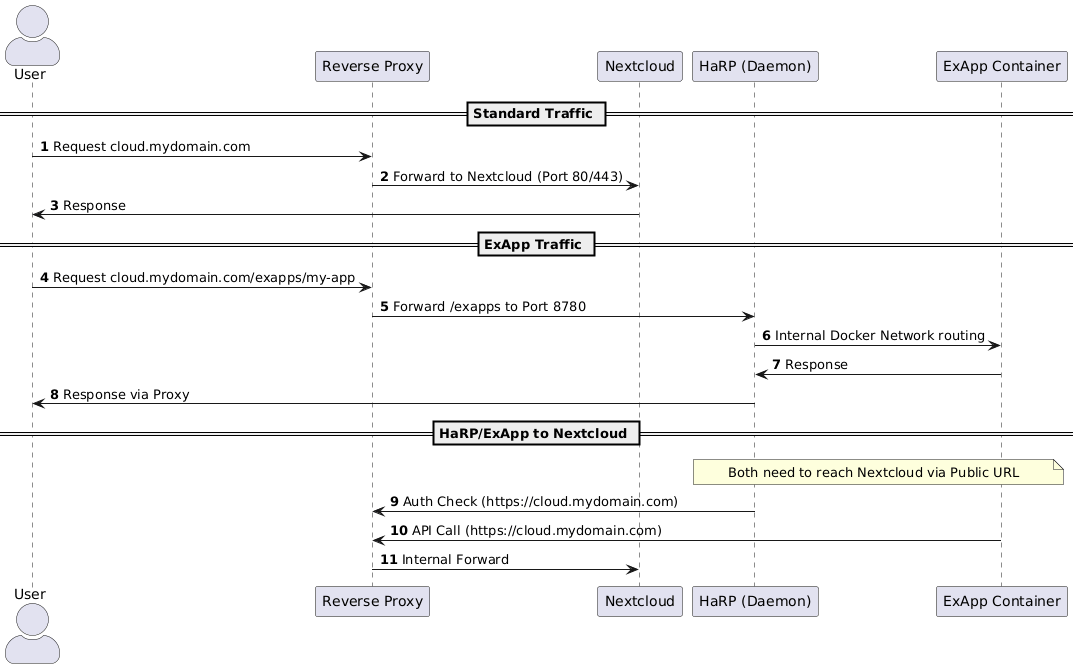
- The reverse proxy obviously must be able to reach both Nextcloud and HaRP.
- Nextcloud must be able to reach HaRP, for example internlly on a docker network. HaRP does not care if is it installed on a different host machine than Nextcloud and allows access via HTTPS.
- HaRP must be able to reach the apps it deploys. When you register the deploy daemon in Nextcloud, you can specify any docker network to be used for this.
- HaRP must be able to access Nextcloud using its public URL. If you are using non-FQDNS, or simply, if HaRP cannot resolve your Nextcloud's URL, make sure to configure its
/etc/hostsfile or configure the container to use a DNS server which can resolve the domain. - The deployed ExApps must be able to access Nextcloud via the public URL as well.
Reverse Proxy
- Routes requsts to Nextcloud:
https://cloud.mydomain.com/index.php/... - Routes requests to the subpath /exapps to HaRP at port 8780 (
https://cloud.mydomain.com/exapps/...) - Sets correct headers for HaRP: like,
HostandX-Forwarded-For
A Diagram
Here is a diagram:
More Details
For more concrete examples and up-to-date documentation, please refer to Nextcloud's HaRP repository here: https://github.com/nextcloud/HaRP